
Case study — Healthcare
Blood Pressure Mobile App Testing Case Study
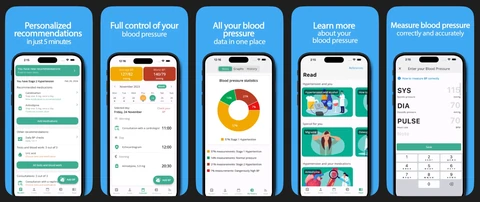
Mobile app for recording blood pressure, viewing statistics, and reading blood pressure information.
Project overview
- Client
- Blood pressure tracking mobile app
- Industry
- Healthcare
- Services
- QA Testing, Mobile Development
- Focus
- Mobile App Testing
QA Labs worked with a blood pressure tracking mobile app on mobile app testing.
About the client
The client's MyBP app helps people manage and monitor their blood pressure. According to its Google Play listing, users log readings and review their history over time, see trends and personalised insights, set reminders for medication, doctor appointments and blood work, back up their data and share it with their healthcare provider, and read educational content on hypertension and lifestyle changes. In a health app, readings and statistics must be recorded and displayed accurately on every supported device.
What matters for a product like this
The quality risks this type of product carries, and how we test for them
- Accurate readings and statistics — Every reading must be saved exactly as entered, and every average or trend calculated from the right readings. We enter known values and check the history, calendar and statistics against expected results, including very high and very low values.
- Reminders that fire on time — Medication and appointment reminders depend on notification permissions, time zones and the phone's battery settings. We test them on real iOS and Android devices, after restarts and with the app closed.
- Health data privacy — Readings are personal health information. We check that data is visible only to the signed-in user, that backup and sharing work as described, and that nothing sensitive appears in notifications or logs.
- Readable for every user — Many people who track blood pressure are older adults. We check text size, contrast and screen-reader labels on key screens so readings and warnings stay easy to read.
Project scope
- Mobile app testing — the focus of the engagement
- Reading entry and statistics
- Health information screens
How QA Labs approaches Mobile App Testing
Our standard process for this type of work
iOS and Android apps tested on real devices for function, UI, performance, and store readiness.
- 01 Define the device matrix — Pick devices and OS versions that match your users.
- 02 Test on real devices — Manual and automated testing on physical hardware.
- 03 Check store readiness — Review against platform guidelines before submission.
- 04 Report and retest — Bugs logged with device details and verified after fixes.
What we typically check
- Functional flows on iOS and Android
- Layouts across screen sizes and OS versions
- Offline, poor network, and interruptions
- Battery, memory, and launch performance
- App Store and Google Play guideline compliance
What this type of engagement delivers
- A device and OS test matrix based on your users
- Functional, UI and interruption testing on real devices
- Store-readiness checks against App Store and Google Play guidelines
- Automated smoke tests with Appium, Espresso or XCUITest if needed
“QA Labs provided detailed report in a timely manner. High quality testing and feedback. Also provided recommended prioritization for the required fixes. Very satisfied with the job done.”
FAQ
What kind of product is this?+
A mobile app for recording blood pressure, viewing statistics and reading blood pressure information.
What did QA Labs cover in this engagement?+
Mobile app testing. The engagement also covered reading entry and statistics and health information screens.
What does mobile app testing cover for a health app?+
Accuracy of readings and statistics, reminders and notifications, sign-in and data privacy, backup and sharing, accessibility, and behaviour across real iOS and Android devices, OS versions and screen sizes.
Why test health apps on real devices?+
Notifications, permissions, battery optimisation and font scaling behave differently on real phones than in simulators, and those are exactly the areas where a health app's reminders and readings can fail.
Can QA Labs help with health app testing for a similar product?+
Yes. Every engagement starts with a free starter package: a scoping call and a short written audit of your product, with an NDA on day one. Most projects begin within 5–7 business days, with at least 4 hours of daily overlap with your team.
By Kawsher, Founder, QA Labs · Published 2026-10-10 · Updated 2026-11-02
Planning Mobile App Testing work for your product?
Start with a free scoping call and a short written audit of your product, with an NDA on day one.
Related case studies

Web & iOS Video App QA Testing Case Study
Web and iOS platform for collecting video clips through a shared link.
Telehealth Accessibility Testing Case Study
Telehealth platform connecting patients with licensed providers online.
FinTech API Testing Case Study
Business valuations and appraisals for SBA lenders and banks.