
A1 — QA Testing
Manual Testing Services
Experienced testers explore your product like real users and find the bugs scripts miss.
Free Starter package
Start with a free QA risk review.
- Free scoping call
- Written review of your test coverage and release risks
- Recommended test plan and quote
“QA Labs team have been exceptional QA testers! He's very responsive, insightful, and always goes above and beyond. I look forward to our continued collaboration and to adding additional resources from the agency. Highly recommend!”
Overview
What is manual testing?
Manual testing is experienced testers using your product the way real users do, to find the bugs scripts miss. It combines scripted test cases for critical flows such as sign-up, checkout and permissions with time-boxed exploratory testing. Every bug report includes exact steps, expected and actual results, the environment, a severity and a screenshot or recording.
Automated tests only check what someone thought to write down. Manual testing is where experienced testers use your product the way real people do: trying unexpected inputs, switching devices halfway through a task, and noticing when something feels wrong even if it technically works.
We combine structured test cases for your critical flows with time-boxed exploratory sessions on new features. Every bug comes with clear steps, evidence and a severity your developers can act on, logged straight into your tracker.
What we test
- 01
Core user journeys and business-critical flows
- 02
Edge cases, unusual inputs, and error states
- 03
New features before they reach automation
- 04
UI consistency across screens and states
- 05
Bug fix verification and release sign-off
Our process
- 1
Learn the product
We study requirements, user roles, and risk areas.
- 2
Write test charters
Structured test cases and exploratory charters per feature.
- 3
Test each build
Testers run cases and explore on real browsers and devices.
- 4
Report clearly
Bugs logged with steps, evidence, and severity in your tracker.
Signs you need manual testing
- New features ship faster than anyone can automate tests for them
- Bugs reach users in flows that 'passed' automated checks
- Your product has many roles, permissions or complex journeys
- You need an independent sign-off before releases
Scripted or exploratory testing?
Manual testing has two halves. Scripted test cases make sure every critical flow is checked the same way every release: sign-up, checkout, billing, permissions. Exploratory testing gives an experienced tester a goal and a time box, and lets them use the product the way real people do.
Scripted tests catch regressions in known behaviour. Exploratory sessions find what nobody wrote down: a form that loses data on the back button, a confusing error message, a layout that breaks at an odd screen width. We use both on every engagement.
What does a good bug report look like?
A bug that developers can't reproduce costs more time than it saves. Every report we file has a clear title, the exact steps, the expected and actual result, the environment and build, a severity based on user impact, and a screenshot or screen recording.
We also group related issues and flag the ones that block a release, so your team fixes what matters first instead of working through a long flat list.
A typical finding
A discount applied twice after going back in checkout
What we saw
Applying a coupon, pressing the browser back button and continuing applied the discount a second time.
Why it mattered
Orders went through at a lower price than intended, and automated tests that never pressed back did not catch it.
The fix
The server now recalculates the total from the cart on every step; the scenario was added to the regression checklist.
An illustration of a common defect of this kind, not a specific client's data.
Who it's for
- Teams shipping new features faster than they can automate tests for them
- Products with complex user journeys, roles or permissions
- Teams that need an independent check and sign-off before a release
What you get
- Test cases and exploratory charters for each feature in scope
- Reproducible bug reports with screenshots or video, logged in your tracker
- Fix verification and a release sign-off for each build
- A weekly summary of what was tested, what was found and the open risks
Manual Testing questions, answered
Is manual testing still worth it if we have automation?+
Yes. Automation is best for repeating known checks; manual and exploratory testing finds the problems nobody predicted, such as confusing flows, layout issues and edge cases. Most teams need both, and manual testing on a new feature is often what tells you which tests to automate next.
Which tools do your testers use?+
We work in your tracker and test management tool, commonly Jira and TestRail, and test on real browsers and devices with BrowserStack, Chrome DevTools and Charles Proxy for network inspection.
How quickly can you start?+
Most engagements start within 5–7 business days of agreeing scope, and urgent launch work can start within 48 hours.
How do you decide what to test manually and what to automate?+
We automate stable flows that run every release, such as login and checkout. New features, visual checks and exploratory work stay manual until the feature settles.
Do you write test cases for us?+
Yes. We write test cases and exploratory charters in your test management tool or a shared document, and keep them up to date as features change.
Can you test in our staging environment only?+
Yes. Most testing happens in staging or a dedicated test environment. We only test in production with your agreement, using test accounts and without touching real customer data.
Tools
- TestRail
- Jira
- BrowserStack
- Chrome DevTools
- Charles Proxy
Related
Reduce QA Cycle Time
Cut regression from days to hours
SolutionPre-Launch QA Audit
Find launch-blocking bugs before users do
GuideManual Testing in 2026 — When It Still Wins Over Automation
Manual testing didn't die when automation arrived. It just moved up the stack — from regression to judgment. Here's where manual still outperforms automation, and how to blend both without wasting either.
ServiceAll QA Testing services
Manual and automated testing on real devices.
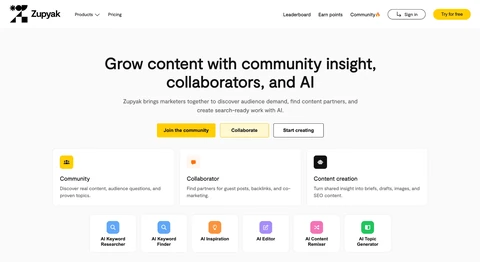
AI Web App Functional QA Testing Case Study
SaaS platform for community insight, collaboration, and AI-assisted content creation.

Health E-commerce Website Audit Case Study
Online health and wellness shop with category, brand, and product browsing.

Web3 Live-Race Game QA Testing Case Study
Browser-based horse racing game with collectible characters and live races.
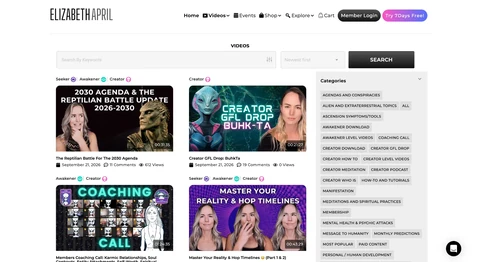
WordPress Video Membership Website Testing
WordPress website with a searchable video library, content categories, and member login.